
In part 5 you learned to select objects by label. This episode is about organising a cluster so that those selections stay meaningful when there are hundreds of objects and several teams. You will use namespaces to give each team its own space for names, set a default namespace so you stop typing -n, label objects with the convention the whole ecosystem understands, and attach notes with annotations. You need the kind cluster and the k8s-from-zero namespace from part 4. We tested on kind v0.33.0 (node image v1.37.0) with kubectl v1.37.2; our cluster and context are named after the lab, k8s-ep04 and kind-k8s-ep04, so yours will show your own names.
What you will build
You will create two team namespaces, run a Pod named web in each of them at the same time, point your kubectl context at a namespace, then build a small “shop” whose Pods carry the recommended app.kubernetes.io labels and a few annotations. At the end you delete a whole namespace in one command and watch its contents go with it.
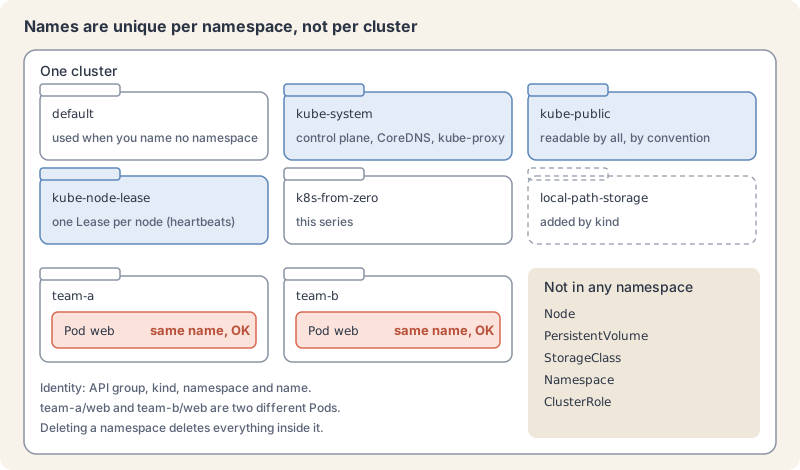
Namespaces scope names
A namespace is a named scope inside one cluster. The namespaces page says resource names must be unique within a namespace, and the same name may appear in other namespaces. Two Pods called web can exist at once if they live in different namespaces. Namespaces cannot be nested, and each namespaced object belongs to exactly one.
Every cluster starts with four:
default: where objects go when you do not name a namespace.kube-system: objects created by the Kubernetes system, such as the control plane Pods and CoreDNS.kube-public: readable by all clients, including unauthenticated ones. The docs say the public part is a convention, not a requirement.kube-node-lease: one Lease object per node. The kubelet renews it as a heartbeat so the control plane can spot a failed node.
kind adds a fifth, local-path-storage, for its storage provisioner, and you added k8s-from-zero in part 4. Avoid names starting with kube-; that prefix is reserved for the system.
Namespace names must be valid DNS labels: lowercase letters, digits and -, at most 63 characters. That matters because a namespace becomes part of DNS names. A Service named api in namespace team-a is reachable as api.team-a.svc.cluster.local, and a Pod in team-a can call it by the short name api. Part 8 covers Service DNS.
When to use them: the docs suggest namespaces for clusters with many users across teams or projects, and say small clusters may not need them at all. They also say to use labels, not separate namespaces, for slightly different versions of the same software. For production, the docs advise against using default; create your own instead.
A namespace on its own does not stop a Pod in team-a from talking to a Pod in team-b, or a user from reading both. It is the unit that access rules (part 20), resource quotas (part 11) and network policies (part 64) attach to. Think of it as the folder, with the locks added later.
Not everything lives in a namespace
Most objects you work with are namespaced: Pods, Services, Deployments, ConfigMaps, Secrets. Some describe the whole cluster and are cluster-scoped: Nodes, PersistentVolumes, StorageClasses, and Namespaces themselves. kubectl api-resources tells you which is which in its NAMESPACED column.
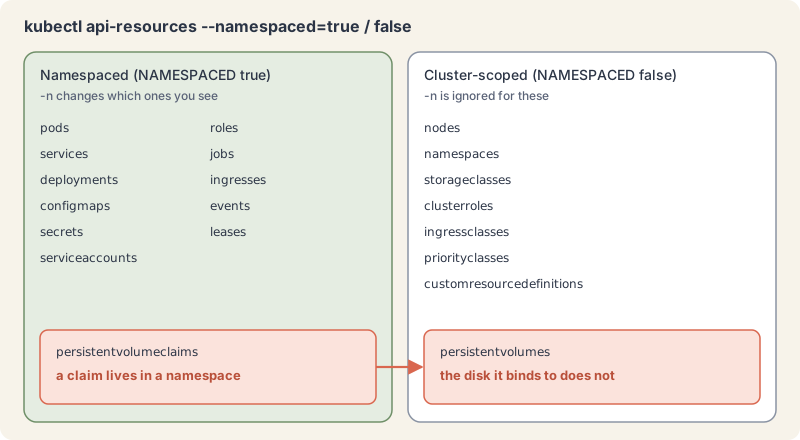
The highlighted pair is a classic source of confusion. A PersistentVolumeClaim (a request for storage) lives in your namespace; the PersistentVolume it binds to is a cluster-wide object. Part 13 builds on that. For cluster-scoped objects, -n is silently ignored, as you will see in the lab.
Labels follow a shared convention
You met labels in part 5 as key/value pairs you can select on. The labels page sets the syntax:
- A key has an optional prefix and a name, separated by
/, as inapp.kubernetes.io/name. The name is at most 63 characters, starting and ending with a letter or digit, with-,_and.allowed in between. The prefix, if present, is a DNS subdomain of up to 253 characters. - A value is at most 63 characters, may be empty, and follows the same character rules. No spaces.
- Keys without a prefix are private to you. Automated tools must use a prefix. The prefixes
kubernetes.io/andk8s.io/are reserved for Kubernetes core components.
Anyone can invent labels, so the project publishes a recommended set that tools such as Helm, dashboards and cost reports understand. They all share the prefix app.kubernetes.io.
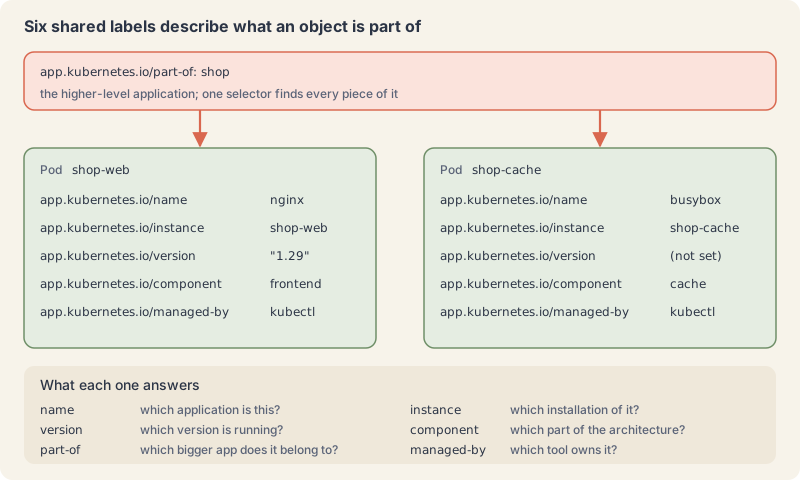
| Key | Answers | Example |
|---|---|---|
app.kubernetes.io/name |
which application is this | nginx |
app.kubernetes.io/instance |
which installation of it, unique per install | shop-web |
app.kubernetes.io/version |
which version | "1.29" |
app.kubernetes.io/component |
which part of the architecture | frontend |
app.kubernetes.io/part-of |
which larger application it belongs to | shop |
app.kubernetes.io/managed-by |
which tool manages it | kubectl, Helm |
The docs call these recommended, not required, and suggest putting them on every object. Quote values that look like numbers, such as "1.29", because label values must be strings. You can still add your own short labels like tier or team next to them.
Annotations hold everything else
Labels are for identifying and selecting. Everything else you want to attach goes in annotations: who owns the object, a runbook link, a build ID, a Git commit, instructions for a tool. The annotations page lists those uses.
Annotation keys follow the same prefix and name rules as label keys, including the reserved prefixes. Values have no character restrictions: spaces, URLs, JSON and YAML are all fine. The total size of all annotations on one object is limited to 256 KiB. You cannot select objects by annotation; there is no -l for them.
You have already seen one: kubectl.kubernetes.io/last-applied-configuration, which kubectl apply writes to remember your file (part 5). Tools you meet later, such as ingress controllers and Helm, read and write their own annotations in the same way. For your own notes, use a prefix you control; the lab uses example.com/.
Try it: organise a cluster
- List the namespaces and look into two of them.
kubectl get namespacesExplain this command
kubectl get namespaceskubectlThe Kubernetes command-line client. Subcommands and flags are documented under kubernetes.io/docs/reference/kubectl/.getDisplay one or many resources. kubectl get prints a table of the most important information about the resources you name.namespacesThe resource type to display. kubectl get points you to kubectl api-resources for the full list of types the server supports.
NAME                 STATUS   AGE
default              Active   9m26s
k8s-from-zero        Active   8m35s
kube-node-lease      Active   9m26s
kube-public          Active   9m26s
kube-system          Active   9m26s
local-path-storage Active 9m22skubectl get pods
kubectl get pods -n kube-systemExplain this command
kubectl get pods
kubectl get pods -n kube-systemkubectlThe Kubernetes command-line client. Subcommands and flags are documented under kubernetes.io/docs/reference/kubectl/.getDisplay one or many resources. kubectl get prints a table of the most important information about the resources you name.podsThe resource type to display. kubectl get points you to kubectl api-resources for the full list of types the server supports.kubectlThe Kubernetes command-line client. Subcommands and flags are documented under kubernetes.io/docs/reference/kubectl/.getDisplay one or many resources. kubectl get prints a table of the most important information about the resources you name.podsThe resource type to display. kubectl get points you to kubectl api-resources for the full list of types the server supports.-nShort form of --namespace. If present, the namespace scope for this CLI request.kube-systemThe namespace name passed to --namespace.
No resources found in default namespace.
NAME                                             READY   STATUS    RESTARTS   AGE
coredns-559f6c778d-h9g5n                         1/1     Running   0          9m16s
coredns-559f6c778d-m8h64                         1/1     Running   0          9m16s
etcd-k8s-ep04-control-plane                      1/1     Running   0          9m25s
kindnet-vb7rl                                    1/1     Running   0          9m16s
kube-apiserver-k8s-ep04-control-plane            1/1     Running   0          9m24s
kube-controller-manager-k8s-ep04-control-plane   1/1     Running   0          9m24s
kube-proxy-9whjj                                 1/1     Running   0          9m16s
kube-scheduler-k8s-ep04-control-plane            1/1     Running   0          9m24s
There is the control plane from part 2, running as Pods in kube-system.
- Create two namespaces from a file. Namespaces are objects like any other, so they can carry labels. Save as
teams.yaml:
apiVersion: v1
kind: Namespace
metadata:
  name: team-a
  labels:
    team: a
---
apiVersion: v1
kind: Namespace
metadata:
  name: team-b
  labels:
team: bkubectl apply -f teams.yamlExplain this command
kubectl apply -f teams.yamlkubectlThe Kubernetes command-line client. Subcommands and flags are documented under kubernetes.io/docs/reference/kubectl/.applyApply a configuration to a resource by file name or stdin. The apply docs say the resource is created if it does not exist yet. JSON and YAML are accepted.-fShort form of --filename. The file, directory or URL that contains the configuration to apply.teams.yamlThe file named by --filename. apply creates the objects or updates them to match this file.
namespace/team-a created
namespace/team-b created- Run the same Pod name in both. Save as
web-team-a.yaml, then copy it toweb-team-b.yamland change only the namespace:
apiVersion: v1
kind: Pod
metadata:
  name: web
  namespace: team-a
  labels:
    app.kubernetes.io/name: web
spec:
  containers:
    - name: web
image: nginx:1.29-alpinekubectl apply -f web-team-a.yaml -f web-team-b.yaml
kubectl get pods -A -l app.kubernetes.io/name=webExplain this command
kubectl apply -f web-team-a.yaml -f web-team-b.yaml
kubectl get pods -A -l app.kubernetes.io/name=webkubectlThe Kubernetes command-line client. Subcommands and flags are documented under kubernetes.io/docs/reference/kubectl/.applyApply a configuration to a resource by file name or stdin. The apply docs say the resource is created if it does not exist yet. JSON and YAML are accepted.-fShort form of --filename. The file, directory or URL that contains the configuration to apply.web-team-a.yamlThe file named by --filename. apply creates the objects or updates them to match this file.-fShort form of --filename. The file, directory or URL that contains the configuration to apply.web-team-b.yamlThe file named by --filename. apply creates the objects or updates them to match this file.kubectlThe Kubernetes command-line client. Subcommands and flags are documented under kubernetes.io/docs/reference/kubectl/.getDisplay one or many resources. kubectl get prints a table of the most important information about the resources you name.podsThe resource type to display. kubectl get points you to kubectl api-resources for the full list of types the server supports.-AShort form of --all-namespaces. List the requested object across every namespace. The lesson says this adds a NAMESPACE column.-lShort form of --selector. A label query. The get docs say it supports '=', '==', '!=', 'in' and 'notin', and that matching objects must satisfy every constraint.app.kubernetes.io/name=webThe label query passed to --selector: app.kubernetes.io/name=web.
pod/web created
pod/web created
NAMESPACE   NAME   READY   STATUS    RESTARTS   AGE
team-a      web    1/1     Running   0          1s
team-b      web    1/1     Running   0          1s
-A (short for --all-namespaces) lists across every namespace and adds a NAMESPACE column. Two Pods, one name, no conflict.
- See the automatic label. The control plane adds an immutable label
kubernetes.io/metadata.nameto every namespace, so you can always select a namespace by its name:
kubectl get ns team-a --show-labels
kubectl get ns -l team=bExplain this command
kubectl get ns team-a --show-labels
kubectl get ns -l team=bkubectlThe Kubernetes command-line client. Subcommands and flags are documented under kubernetes.io/docs/reference/kubectl/.getDisplay one or many resources. kubectl get prints a table of the most important information about the resources you name.nsThe resource type to display. kubectl get points you to kubectl api-resources for the full list of types the server supports.team-aThe object name.--show-labelsWhen printing, show all labels as the last column. The get docs say that column is hidden by default.kubectlThe Kubernetes command-line client. Subcommands and flags are documented under kubernetes.io/docs/reference/kubectl/.getDisplay one or many resources. kubectl get prints a table of the most important information about the resources you name.nsThe resource type to display. kubectl get points you to kubectl api-resources for the full list of types the server supports.-lShort form of --selector. A label query. The get docs say it supports '=', '==', '!=', 'in' and 'notin', and that matching objects must satisfy every constraint.team=bThe label query passed to --selector: team=b.
NAME     STATUS   AGE   LABELS
team-a   Active   6s    kubernetes.io/metadata.name=team-a,team=a
NAME     STATUS   AGE
team-b Active 6s- Break the naming rule on purpose.
kubectl create namespace Team_CExplain this command
kubectl create namespace Team_CkubectlThe Kubernetes command-line client. Subcommands and flags are documented under kubernetes.io/docs/reference/kubectl/.createCreate a resource from a file or from stdin, or through a subcommand such as namespace.namespaceThe resource type.Team_CThe name passed to create namespace. The lesson spells it Team_C, and the API rejects it because a namespace name must be a lowercase RFC 1123 label.
The Namespace "Team_C" is invalid: metadata.name: Invalid value: "Team_C": a lowercase RFC 1123 label must consist of lower case alphanumeric characters or '-', and must start and end with an alphanumeric character (e.g. 'my-name', or '123-abc', regex used for validation is '[a-z0-9]([-a-z0-9]*[a-z0-9])?')- Set a default namespace on your context. Typing
-nevery time gets old. A kubeconfig context (part 3) can carry a namespace:
kubectl config set-context --current --namespace=team-a
kubectl config view --minify | grep namespace:
kubectl get podsExplain this command
kubectl config set-context --current --namespace=team-a
kubectl config view --minify | grep namespace:
kubectl get podskubectlThe Kubernetes command-line client. Subcommands and flags are documented under kubernetes.io/docs/reference/kubectl/.configThe command group for kubeconfig entries.set-contextSet a context entry in kubeconfig. The docs say that if the name already exists, new fields merge on top of the existing values for those fields.--currentModify the current context. The set-context synopsis allows a name or --current.--namespace=team-aThe namespace name. This flag sets it to team-a.kubectlThe Kubernetes command-line client. Subcommands and flags are documented under kubernetes.io/docs/reference/kubectl/.configThe command group for kubeconfig entries.viewDisplay the merged kubeconfig. The lesson pairs it with --minify and grep to read the context namespace.--minifyRemove all information not used by the current context from the output. The lesson uses it to read the context namespace.|Shell. Sends the previous command's standard output to the next command.grepShell. Prints input lines that match a pattern.namespace:The pattern grep looks for.kubectlThe Kubernetes command-line client. Subcommands and flags are documented under kubernetes.io/docs/reference/kubectl/.getDisplay one or many resources. kubectl get prints a table of the most important information about the resources you name.podsThe resource type to display. kubectl get points you to kubectl api-resources for the full list of types the server supports.
Context "kind-k8s-ep04" modified.
    namespace: team-a
NAME   READY   STATUS    RESTARTS   AGE
web    1/1     Running   0          6s
Plain kubectl get pods now looks in team-a. Set it to the series namespace for the rest of this episode:
kubectl config set-context --current --namespace=k8s-from-zeroExplain this command
kubectl config set-context --current --namespace=k8s-from-zerokubectlThe Kubernetes command-line client. Subcommands and flags are documented under kubernetes.io/docs/reference/kubectl/.configThe command group for kubeconfig entries.set-contextSet a context entry in kubeconfig. The docs say that if the name already exists, new fields merge on top of the existing values for those fields.--currentModify the current context. The set-context synopsis allows a name or --current.--namespace=k8s-from-zeroThe namespace name. This flag sets it to k8s-from-zero.
Context "kind-k8s-ep04" modified.A flag still wins: -n kube-system looks there for that one command. Be careful with this setting: a forgotten context namespace is a common reason for “my Pod is gone” or, worse, a delete in the wrong place. Part 23 shows tools that print the current namespace in your prompt.
- Ask which types are namespaced.
kubectl api-resources --namespaced=false | head -5
kubectl api-resources --namespaced=true -o name | head -8Explain this command
kubectl api-resources --namespaced=false | head -5
kubectl api-resources --namespaced=true -o name | head -8kubectlThe Kubernetes command-line client. Subcommands and flags are documented under kubernetes.io/docs/reference/kubectl/.api-resourcesPrint the supported API resources on the server.--namespaced=falseLimit the list to cluster-scoped resource types. The lesson uses this for objects such as Nodes, PersistentVolumes and StorageClasses.|Shell. Sends the previous command's standard output to the next command.headShell. Prints the beginning of its input.-5How many lines head prints. Here, the first 5.kubectlThe Kubernetes command-line client. Subcommands and flags are documented under kubernetes.io/docs/reference/kubectl/.api-resourcesPrint the supported API resources on the server.--namespaced=trueLimit the list to namespaced resource types. The lesson uses this to see which objects live inside a namespace.-oShort form of --output. It selects the output format. For get, the formats include json, yaml, name, jsonpath, custom-columns and wide.nameAn output format. With api-resources, -o name prints only the resource names, one per line. The lesson's output starts bindings, configmaps, endpoints.|Shell. Sends the previous command's standard output to the next command.headShell. Prints the beginning of its input.-8How many lines head prints. Here, the first 8.
NAME                                SHORTNAMES   APIVERSION                        NAMESPACED   KIND
componentstatuses                   cs           v1                                false        ComponentStatus
namespaces                          ns           v1                                false        Namespace
nodes                               no           v1                                false        Node
persistentvolumes                   pv           v1                                false        PersistentVolume
bindings
configmaps
endpoints
events
limitranges
persistentvolumeclaims
pods
podtemplates
For a cluster-scoped type, -n changes nothing:
kubectl get nodes -n team-a
kubectl get storageclass -n team-aExplain this command
kubectl get nodes -n team-a
kubectl get storageclass -n team-akubectlThe Kubernetes command-line client. Subcommands and flags are documented under kubernetes.io/docs/reference/kubectl/.getDisplay one or many resources. kubectl get prints a table of the most important information about the resources you name.nodesThe resource type to display. kubectl get points you to kubectl api-resources for the full list of types the server supports.-nShort form of --namespace. If present, the namespace scope for this CLI request.team-aThe namespace name passed to --namespace.kubectlThe Kubernetes command-line client. Subcommands and flags are documented under kubernetes.io/docs/reference/kubectl/.getDisplay one or many resources. kubectl get prints a table of the most important information about the resources you name.storageclassThe resource type to display. kubectl get points you to kubectl api-resources for the full list of types the server supports.-nShort form of --namespace. If present, the namespace scope for this CLI request.team-aThe namespace name passed to --namespace.
NAME                     STATUS   ROLES           AGE     VERSION
k8s-ep04-control-plane   Ready    control-plane   9m32s   v1.37.0
NAME                 PROVISIONER             RECLAIMPOLICY   VOLUMEBINDINGMODE      ALLOWVOLUMEEXPANSION   AGE
standard (default) rancher.io/local-path Delete WaitForFirstConsumer false 9m58s- Delete a namespace, and everything in it.
kubectl get all -n team-b
kubectl delete namespace team-b
kubectl get pods -A -l app.kubernetes.io/name=webExplain this command
kubectl get all -n team-b
kubectl delete namespace team-b
kubectl get pods -A -l app.kubernetes.io/name=webkubectlThe Kubernetes command-line client. Subcommands and flags are documented under kubernetes.io/docs/reference/kubectl/.getDisplay one or many resources. kubectl get prints a table of the most important information about the resources you name.allA resource category. The CustomResourceDefinition docs say kubectl get category-name lists the resources that belong to that category, and all is one such category, not every resource type. The lesson uses it to look inside team-b before deleting it.-nShort form of --namespace. If present, the namespace scope for this CLI request.team-bThe namespace name passed to --namespace.kubectlThe Kubernetes command-line client. Subcommands and flags are documented under kubernetes.io/docs/reference/kubectl/.deleteDelete resources by file names, stdin, resources and names, or by resources and label selector.namespaceThe resource type.team-bThe object name.kubectlThe Kubernetes command-line client. Subcommands and flags are documented under kubernetes.io/docs/reference/kubectl/.getDisplay one or many resources. kubectl get prints a table of the most important information about the resources you name.podsThe resource type to display. kubectl get points you to kubectl api-resources for the full list of types the server supports.-AShort form of --all-namespaces. List the requested object across every namespace. The lesson says this adds a NAMESPACE column.-lShort form of --selector. A label query. The get docs say it supports '=', '==', '!=', 'in' and 'notin', and that matching objects must satisfy every constraint.app.kubernetes.io/name=webThe label query passed to --selector: app.kubernetes.io/name=web.
NAME      READY   STATUS    RESTARTS   AGE
pod/web   1/1     Running   0          1s
namespace "team-b" deleted
NAMESPACE   NAME   READY   STATUS    RESTARTS   AGE
team-a      web    1/1     Running   0          11s
The web Pod in team-b went with its namespace. One command removed everything inside, which makes it the most dangerous command in this episode. That is why we listed the namespace first with kubectl get all -n team-b; do the same before you delete anything that matters.
- Build the labelled shop. Save as
shop-web.yaml. The first Pod carries all six recommended labels and three annotations; the second carries the labels that apply to it.
apiVersion: v1
kind: Pod
metadata:
  name: shop-web
  namespace: k8s-from-zero
  labels:
    app.kubernetes.io/name: nginx
    app.kubernetes.io/instance: shop-web
    app.kubernetes.io/version: "1.29"
    app.kubernetes.io/component: frontend
    app.kubernetes.io/part-of: shop
    app.kubernetes.io/managed-by: kubectl
  annotations:
    example.com/owner: "payments-team@example.com"
    example.com/runbook: "https://wiki.example.com/shop/web"
    example.com/description: "Storefront web server. Talk to #payments before changing."
spec:
  containers:
    - name: web
      image: nginx:1.29-alpine
---
apiVersion: v1
kind: Pod
metadata:
  name: shop-cache
  namespace: k8s-from-zero
  labels:
    app.kubernetes.io/name: busybox
    app.kubernetes.io/instance: shop-cache
    app.kubernetes.io/component: cache
    app.kubernetes.io/part-of: shop
    app.kubernetes.io/managed-by: kubectl
spec:
  containers:
    - name: cache
      image: busybox:1.37
      command: ["sleep", "3600"]
The shop-cache Pod only sleeps; it stands in for a real cache so the example stays small.
kubectl apply -f shop-web.yaml
kubectl get pods -l app.kubernetes.io/part-of=shop -L app.kubernetes.io/componentExplain this command
kubectl apply -f shop-web.yaml
kubectl get pods -l app.kubernetes.io/part-of=shop -L app.kubernetes.io/componentkubectlThe Kubernetes command-line client. Subcommands and flags are documented under kubernetes.io/docs/reference/kubectl/.applyApply a configuration to a resource by file name or stdin. The apply docs say the resource is created if it does not exist yet. JSON and YAML are accepted.-fShort form of --filename. The file, directory or URL that contains the configuration to apply.shop-web.yamlThe file named by --filename. apply creates the objects or updates them to match this file.kubectlThe Kubernetes command-line client. Subcommands and flags are documented under kubernetes.io/docs/reference/kubectl/.getDisplay one or many resources. kubectl get prints a table of the most important information about the resources you name.podsThe resource type to display. kubectl get points you to kubectl api-resources for the full list of types the server supports.-lShort form of --selector. A label query. The get docs say it supports '=', '==', '!=', 'in' and 'notin', and that matching objects must satisfy every constraint.app.kubernetes.io/part-of=shopThe label query passed to --selector: app.kubernetes.io/part-of=shop.-LShort form of --label-columns. The get docs say it accepts a comma-separated list of labels to present as columns, and that names are case-sensitive.app.kubernetes.io/componentA label key for --label-columns. The get docs present it as a column.
pod/shop-web created
pod/shop-cache created
NAME         READY   STATUS    RESTARTS   AGE   COMPONENT
shop-cache   1/1     Running   0          6s    cache
shop-web     1/1     Running   0          6s    frontend
One selector on part-of found every piece of the shop. No -n needed, thanks to step 6.
- Read labels and annotations.
describeshows both:
kubectl describe pod shop-webExplain this command
kubectl describe pod shop-webkubectlThe Kubernetes command-line client. Subcommands and flags are documented under kubernetes.io/docs/reference/kubectl/.describeShow details of a specific resource or group of resources. The describe docs say this includes related resources such as events or controllers.podThe resource type.shop-webThe object name.
...
Labels:           app.kubernetes.io/component=frontend
                  app.kubernetes.io/instance=shop-web
                  app.kubernetes.io/managed-by=kubectl
                  app.kubernetes.io/name=nginx
                  app.kubernetes.io/part-of=shop
                  app.kubernetes.io/version=1.29
Annotations:      example.com/description: Storefront web server. Talk to #payments before changing.
                  example.com/owner: payments-team@example.com
                  example.com/runbook: https://wiki.example.com/shop/web
Status:           Running
...
To read one key with JSONPath or custom columns, escape the dots inside the key with a backslash:
kubectl get pod shop-web -o jsonpath='{.metadata.annotations.example\.com/owner}{"\n"}'
kubectl get pods -o custom-columns='NAME:.metadata.name,PART-OF:.metadata.labels.app\.kubernetes\.io/part-of,OWNER:.metadata.annotations.example\.com/owner'Explain this command
kubectl get pod shop-web -o jsonpath='{.metadata.annotations.example\.com/owner}{"\n"}'
kubectl get pods -o custom-columns='NAME:.metadata.name,PART-OF:.metadata.labels.app\.kubernetes\.io/part-of,OWNER:.metadata.annotations.example\.com/owner'kubectlThe Kubernetes command-line client. Subcommands and flags are documented under kubernetes.io/docs/reference/kubectl/.getDisplay one or many resources. kubectl get prints a table of the most important information about the resources you name.podThe resource type to display. kubectl get points you to kubectl api-resources for the full list of types the server supports.shop-webThe object name.-oShort form of --output. It selects the output format. For get, the formats include json, yaml, name, jsonpath, custom-columns and wide.jsonpath='{.metadata.annotations.example\.com/owner}{"\n"}'jsonpath is an output format. A template is JSONPath expressions in curly braces. The JSONPath page says a double-quoted string inserts text, and its example uses a quoted backslash-n for a newline. This token is the template in the lesson command.kubectlThe Kubernetes command-line client. Subcommands and flags are documented under kubernetes.io/docs/reference/kubectl/.getDisplay one or many resources. kubectl get prints a table of the most important information about the resources you name.podsThe resource type to display. kubectl get points you to kubectl api-resources for the full list of types the server supports.-oShort form of --output. It selects the output format. For get, the formats include json, yaml, name, jsonpath, custom-columns and wide.custom-columns='NAME:.metadata.name,PART-OF:.metadata.labels.app\.kubernetes\.io/part-of,OWNER:.metadata.annotations.example\.com/owner'custom-columns is an output format. The get examples write each column as a heading, a colon, and a JSONPath. The headings here are NAME, PART-OF, OWNER.
payments-team@example.com
NAME         PART-OF   OWNER
shop-cache   shop      <none>
shop-web shop payments-team@example.com- Add, change and remove an annotation.
kubectl annotateworks likekubectl label, including--overwriteand the trailing-:
kubectl annotate pod shop-web example.com/last-reviewed="2026-11-10"
kubectl annotate pod shop-web example.com/last-reviewed="2026-11-11"
kubectl annotate pod shop-web example.com/last-reviewed="2026-11-11" --overwrite
kubectl annotate pod shop-web example.com/last-reviewed-Explain this command
kubectl annotate pod shop-web example.com/last-reviewed="2026-11-10"
kubectl annotate pod shop-web example.com/last-reviewed="2026-11-11"
kubectl annotate pod shop-web example.com/last-reviewed="2026-11-11" --overwrite
kubectl annotate pod shop-web example.com/last-reviewed-kubectlThe Kubernetes command-line client. Subcommands and flags are documented under kubernetes.io/docs/reference/kubectl/.annotateUpdate the annotations on a resource. The lesson says kubectl annotate works like kubectl label, including --overwrite and a trailing hyphen to remove a key.podThe resource type.shop-webThe object name.example.com/last-reviewed="2026-11-10"A annotation assignment. This command sets example.com/last-reviewed to "2026-11-10".kubectlThe Kubernetes command-line client. Subcommands and flags are documented under kubernetes.io/docs/reference/kubectl/.annotateUpdate the annotations on a resource. The lesson says kubectl annotate works like kubectl label, including --overwrite and a trailing hyphen to remove a key.podThe resource type.shop-webThe object name.example.com/last-reviewed="2026-11-11"An annotation assignment that fails here. The key already has a value and --overwrite is not given, so the lesson prints error: --overwrite is false but found the following declared annotation(s): 'example.com/last-reviewed' already has a value (2026-11-10).kubectlThe Kubernetes command-line client. Subcommands and flags are documented under kubernetes.io/docs/reference/kubectl/.annotateUpdate the annotations on a resource. The lesson says kubectl annotate works like kubectl label, including --overwrite and a trailing hyphen to remove a key.podThe resource type.shop-webThe object name.example.com/last-reviewed="2026-11-11"A annotation assignment. This command sets example.com/last-reviewed to "2026-11-11".--overwriteIf true, allow annotations to be overwritten, otherwise reject annotation updates that overwrite existing annotations.kubectlThe Kubernetes command-line client. Subcommands and flags are documented under kubernetes.io/docs/reference/kubectl/.annotateUpdate the annotations on a resource. The lesson says kubectl annotate works like kubectl label, including --overwrite and a trailing hyphen to remove a key.podThe resource type.shop-webThe object name.example.com/last-reviewed-The annotation key example.com/last-reviewed with a trailing hyphen. The lesson says this removes that key, and the annotate docs' example says removing an annotation does not require the --overwrite flag.
pod/shop-web annotated
error: --overwrite is false but found the following declared annotation(s): 'example.com/last-reviewed' already has a value (2026-11-10)
pod/shop-web annotated
pod/shop-web annotated- See where labels and annotations differ. A sentence is fine as an annotation and rejected as a label value:
kubectl label pod shop-cache note="talk to payments"Explain this command
kubectl label pod shop-cache note="talk to payments"kubectlThe Kubernetes command-line client. Subcommands and flags are documented under kubernetes.io/docs/reference/kubectl/.labelUpdate the labels on a resource. The label docs say a trailing hyphen on a key removes that label, and --overwrite is required to change a value that is already set.podThe resource type.shop-cacheThe object name.note="talk to payments"A label assignment the API rejects. Label values allow no spaces, so the lesson prints error: invalid label value. The lesson moves this text into an annotation.
error: invalid label value: "note=talk to payments": a valid label must be an empty string or consist of alphanumeric characters, '-', '_' or '.', and must start and end with an alphanumeric character (e.g. 'MyValue', or 'my_value', or '12345', regex used for validation is '(([A-Za-z0-9][-A-Za-z0-9_.]*)?[A-Za-z0-9])?')One more thing we tried: kubectl label pod shop-cache kubernetes.io/my-label=yes succeeded on our cluster. The API accepted it. The docs still reserve that prefix for Kubernetes core components, so we removed it with kubectl label pod shop-cache kubernetes.io/my-label-. Use your own prefix.
- Clean up.
kubectl delete namespace team-a
kubectl delete -f shop-web.yamlExplain this command
kubectl delete namespace team-a
kubectl delete -f shop-web.yamlkubectlThe Kubernetes command-line client. Subcommands and flags are documented under kubernetes.io/docs/reference/kubectl/.deleteDelete resources by file names, stdin, resources and names, or by resources and label selector.namespaceThe resource type.team-aThe object name.kubectlThe Kubernetes command-line client. Subcommands and flags are documented under kubernetes.io/docs/reference/kubectl/.deleteDelete resources by file names, stdin, resources and names, or by resources and label selector.-fShort form of --filename. For delete, the file that contains the resource to delete.shop-web.yamlThe file named by --filename. delete removes the resources that file describes.
namespace "team-a" deleted
pod "shop-web" deleted from k8s-from-zero namespace
pod "shop-cache" deleted from k8s-from-zero namespace
Keep k8s-from-zero and the context namespace you set; the next episodes use both.
When it goes wrong
- “No resources found” for something you created a moment ago. Symptom:
No resources found in default namespace.You are looking in a different namespace from the one the object is in. Add-A, or checkkubectl config view --minify | grep namespace:. - A command hit the wrong namespace. Symptom: an apply or delete changed objects you did not expect. Your context namespace was not what you thought. Put
namespace:in every manifest (as this series does) and check the context before destructive commands. - An invalid name. Symptom:
a lowercase RFC 1123 label must consist of lower case alphanumeric characters or '-'. Namespace names cannot contain capitals, underscores or dots. - A label value is rejected. Symptom:
invalid label value. Label values allow no spaces and at most 63 characters. Move free text into an annotation. - Custom columns show
<none>for a label you know is there. The shell ate the backslashes inapp\.kubernetes\.io. We hit this on the box: unquoted, both columns came back<none>. Wrap the wholecustom-columns=argument in single quotes. - A namespace is stuck in Terminating. Symptom:
kubectl get nsshowsTerminatingfor a long time. Something inside is waiting on a finalizer (a hook that must finish before deletion). Part 22 shows how to find and clear it; do not force-delete without knowing what is waiting.
Cheat sheet
| Task | Command or field | Note |
|---|---|---|
| List namespaces | kubectl get ns |
four start with every cluster |
| Create a namespace | kubectl create namespace team-a |
or kind: Namespace in a file |
| Look in one namespace | kubectl get pods -n kube-system |
-n wins over the context |
| Look in all namespaces | kubectl get pods -A |
adds a NAMESPACE column |
| Set the default namespace | kubectl config set-context --current --namespace=k8s-from-zero |
stored in the kubeconfig context |
| Check the default namespace | kubectl config view --minify | grep namespace: |
empty means default |
| Which types are namespaced | kubectl api-resources --namespaced=true |
false for cluster-scoped |
| Delete a namespace and its contents | kubectl delete namespace team-b |
check with get all -n first |
| Namespace name label | kubernetes.io/metadata.name |
set automatically, immutable |
| Recommended labels | app.kubernetes.io/name, instance, version, component, part-of, managed-by |
put them on every object |
| Select an application | kubectl get pods -l app.kubernetes.io/part-of=shop |
one selector for all pieces |
| Add or change an annotation | kubectl annotate pod shop-web example.com/owner=me --overwrite |
trailing - removes |
| Read one annotation | kubectl get pod shop-web -o jsonpath='{.metadata.annotations.example\.com/owner}' |
escape dots in keys |
| Label value rules | 63 characters, [A-Za-z0-9._-] |
no spaces |
| Annotation size | 256 KiB per object | keys and values combined |
| Reserved prefixes | kubernetes.io/, k8s.io/ |
use your own domain |
apiVersion: v1
kind: Namespace
metadata:
  name: team-a
  labels:
    team: a
Recap and what is next
- Namespaces scope names, start as four built-ins, and take everything inside with them when deleted.
- Some objects, such as Nodes, PersistentVolumes and StorageClasses, are cluster-scoped;
kubectl api-resourcestells you which. - Set a context namespace to save typing, and check it before any delete.
- Use the six
app.kubernetes.iolabels so every tool can tell what an object is and what it is part of. - Put non-identifying information in annotations, under your own prefix.
Next: Kubernetes from Zero, part 7, Deployments and ReplicaSets, coming tomorrow.
Command explanations and quoted passages in this lesson come from or adapt the kubectl reference and the Kubernetes documentation, © The Kubernetes Authors, licensed under CC BY 4.0. We shortened and edited some passages. Kubernetes® is a registered trademark of The Linux Foundation. aitamer.news is not affiliated with or endorsed by The Linux Foundation or the CNCF.
The Campfire
CommentsThanks. Your comment is waiting for the desk. Once it is approved it appears here within about a minute.
Add a comment