
In part 6 you organised a cluster with namespaces and labels. The Pods you have made so far were single, hand-made objects: delete one and it stays gone. This episode hands Pods to a controller. By the end you will run three copies of a web server through a Deployment, watch Kubernetes replace a Pod you delete, scale up and down, roll out a new image without downtime, break a release on purpose and roll it back. You need the kind cluster from part 3 and the k8s-from-zero namespace from part 4, with your context namespace set to it as in part 6. We tested on kind v0.33.0 (node image v1.37.0) with kubectl v1.37.2.
What you will build
You will write one Deployment called web that asks for three nginx Pods. You will then look at the two layers Kubernetes builds under it, a ReplicaSet and its Pods, and follow how the layers point to each other. After that you will change the image twice, once correctly and once with a typo, and use kubectl rollout to watch, inspect and undo those changes.
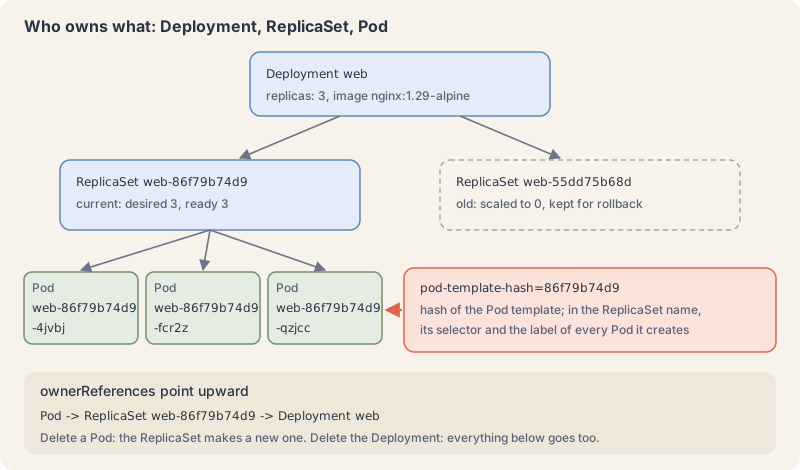
A Deployment manages ReplicaSets, which manage Pods
A ReplicaSet has one job: keep a stated number of Pods that match its label selector running. If there are too few, it creates Pods from its Pod template. If there are too many, it deletes some. That is the self-healing loop from part 1, applied to Pods.
A Deployment sits one level up. The Deployments page describes it as providing declarative updates for Pods and ReplicaSets. You never create the ReplicaSet yourself. The Deployment creates one for each version of the Pod template, and moves Pods from the old one to the new one at a controlled rate when you change the template. The docs say plainly: do not manage ReplicaSets owned by a Deployment.
A Deployment manifest adds three things to the Pod you already know:
replicas: how many Pods you want. It defaults to 1.selector: which Pods belong to this Deployment, by label. It must match the template’s labels, and it cannot be changed after creation.template: a Pod spec withoutapiVersionandkind. Every Pod the Deployment makes is stamped from it.
Each layer records who owns it in metadata.ownerReferences (owners and dependents). A Pod points to its ReplicaSet, and a ReplicaSet points to its Deployment. When you delete the Deployment, the garbage collector follows those references and deletes everything below it.
The Deployment controller also adds a label, pod-template-hash, to each ReplicaSet and its Pods. Its value is a hash of the Pod template, which is why ReplicaSet and Pod names look like web-86f79b74d9-4jvbj: Deployment name, template hash, random suffix. The docs warn you not to change that label.
A rolling update swaps ReplicaSets a few Pods at a time
A rollout starts when, and only when, you change the Pod template (.spec.template): a new image, a new label in the template, a new environment variable. Changing replicas scales the current ReplicaSet and starts no rollout.
With the default strategy, RollingUpdate, the Deployment creates a new ReplicaSet and grows it while shrinking the old one. Two fields set the pace:
maxSurge: how many Pods may exist abovereplicasduring the update. Default 25%, rounded up.maxUnavailable: how many Pods may be unavailable during the update. Default 25%, rounded down.
They cannot both be 0. Our lab uses maxSurge: 1 and maxUnavailable: 0: add one new Pod, wait until it is ready, remove one old Pod, repeat. Capacity never drops, at the cost of one extra Pod while the update runs.
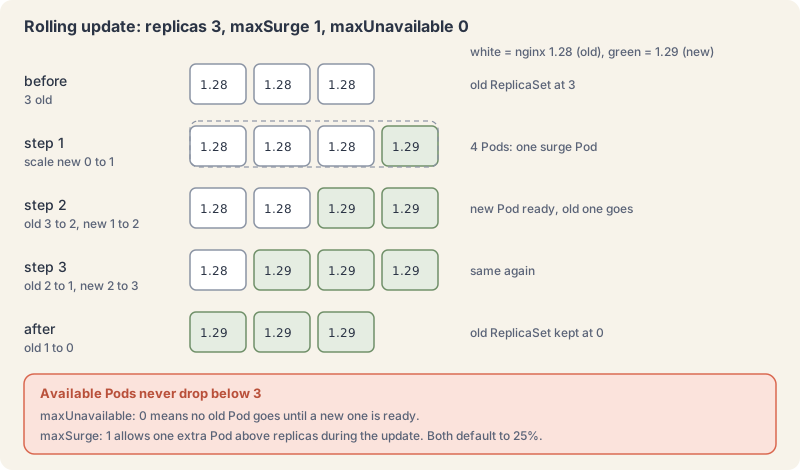
The other strategy, Recreate, deletes all old Pods before creating any new ones. Use it only when two versions must never run at the same time, and accept the gap in service.
“Ready” matters here. Right now a Pod counts as ready as soon as its container starts. Part 10 adds readiness probes so that a Pod only counts once it actually answers, which makes rolling updates much safer.
Rollout history lives in old ReplicaSets
The Deployment keeps old ReplicaSets, scaled to 0, so it can go back. Each one is a revision. .spec.revisionHistoryLimit sets how many old ReplicaSets to keep, 10 by default. The CHANGE-CAUSE column in kubectl rollout history is copied from the Deployment’s kubernetes.io/change-cause annotation when the revision is created, so put a short reason there in your file. The old --record flag that used to fill it is deprecated.
kubectl rollout undo copies an older Pod template back into the Deployment, which starts a normal rollout and records a new revision number. You will see that in step 9.
Try it: run, scale, update and roll back
- Let kubectl draft the YAML (part 5 showed this trick):
kubectl create deployment demo --image=nginx:1.29-alpine --replicas=2 --dry-run=client -o yamlExplain this command
kubectl create deployment demo --image=nginx:1.29-alpine --replicas=2 --dry-run=client -o yamlkubectlThe Kubernetes command-line client. Subcommands and flags are documented under kubernetes.io/docs/reference/kubectl/.createCreate a resource from a file or from stdin, or through a subcommand such as namespace.deploymentThe resource type.demoThe object name.--image=nginx:1.29-alpineThe image for the container to run. The lesson pins the tag nginx:1.29-alpine.--replicas=2The number of desired replicas. This command passes 2.--dry-run=clientA dry run. The run docs say --dry-run must be none, server, or client. Client only prints the object that would be sent, without sending it. The lesson uses client dry-run to write YAML.-oShort form of --output. It selects the output format. For get, the formats include json, yaml, name, jsonpath, custom-columns and wide.yamlAn output format. It prints the object as YAML.
apiVersion: apps/v1
kind: Deployment
metadata:
  labels:
    app: demo
  name: demo
spec:
  replicas: 2
  selector:
    matchLabels:
      app: demo
  strategy: {}
  template:
    metadata:
      labels:
        app: demo
...
The selector and the template labels match. That is the one rule you must keep when you write your own.
- Write the Deployment. Save as
web.yaml. We start on nginx 1.28 so there is something to upgrade to.
apiVersion: apps/v1
kind: Deployment
metadata:
  name: web
  namespace: k8s-from-zero
  labels:
    app.kubernetes.io/name: web
  annotations:
    kubernetes.io/change-cause: "first release, nginx 1.28"
spec:
  replicas: 3
  selector:
    matchLabels:
      app.kubernetes.io/name: web
  strategy:
    type: RollingUpdate
    rollingUpdate:
      maxSurge: 1
      maxUnavailable: 0
  template:
    metadata:
      labels:
        app.kubernetes.io/name: web   # must match the selector
    spec:
      containers:
        - name: web
          image: nginx:1.28-alpine
          ports:
- containerPort: 80kubectl apply -f web.yaml
kubectl rollout status deployment/web --timeout=90sExplain this command
kubectl apply -f web.yaml
kubectl rollout status deployment/web --timeout=90skubectlThe Kubernetes command-line client. Subcommands and flags are documented under kubernetes.io/docs/reference/kubectl/.applyApply a configuration to a resource by file name or stdin. The apply docs say the resource is created if it does not exist yet. JSON and YAML are accepted.-fShort form of --filename. The file, directory or URL that contains the configuration to apply.web.yamlThe file named by --filename. apply creates the objects or updates them to match this file.kubectlThe Kubernetes command-line client. Subcommands and flags are documented under kubernetes.io/docs/reference/kubectl/.rolloutThe command group for rollout actions.statusShow the status of a rollout and wait until it finishes.deployment/webThe resource written as type/name: deployment/web.--timeout=90sHow long to wait before giving up. This command passes 90s.
deployment.apps/web created
Waiting for deployment "web" rollout to finish: 0 of 3 updated replicas are available...
Waiting for deployment "web" rollout to finish: 1 of 3 updated replicas are available...
Waiting for deployment "web" rollout to finish: 2 of 3 updated replicas are available...
deployment "web" successfully rolled out
rollout status waits and exits 0 when the rollout is complete. It is the command to put in a deploy script.
- Look at the three layers.
kubectl get deployment web
kubectl get replicasets
kubectl get pods --show-labelsExplain this command
kubectl get deployment web
kubectl get replicasets
kubectl get pods --show-labelskubectlThe Kubernetes command-line client. Subcommands and flags are documented under kubernetes.io/docs/reference/kubectl/.getDisplay one or many resources. kubectl get prints a table of the most important information about the resources you name.deploymentThe resource type to display. kubectl get points you to kubectl api-resources for the full list of types the server supports.webThe object name.kubectlThe Kubernetes command-line client. Subcommands and flags are documented under kubernetes.io/docs/reference/kubectl/.getDisplay one or many resources. kubectl get prints a table of the most important information about the resources you name.replicasetsThe resource type to display. kubectl get points you to kubectl api-resources for the full list of types the server supports.kubectlThe Kubernetes command-line client. Subcommands and flags are documented under kubernetes.io/docs/reference/kubectl/.getDisplay one or many resources. kubectl get prints a table of the most important information about the resources you name.podsThe resource type to display. kubectl get points you to kubectl api-resources for the full list of types the server supports.--show-labelsWhen printing, show all labels as the last column. The get docs say that column is hidden by default.
NAME   READY   UP-TO-DATE   AVAILABLE   AGE
web    3/3     3            3           1s
NAME             DESIRED   CURRENT   READY   AGE
web-55dd75b68d   3         3         3       1s
NAME                   READY   STATUS    RESTARTS   AGE   LABELS
web-55dd75b68d-5vtbs   1/1     Running   0          1s    app.kubernetes.io/name=web,pod-template-hash=55dd75b68d
web-55dd75b68d-hcvdc   1/1     Running   0          1s    app.kubernetes.io/name=web,pod-template-hash=55dd75b68d
web-55dd75b68d-xrpx6   1/1     Running   0          1s    app.kubernetes.io/name=web,pod-template-hash=55dd75b68d
Your hash and suffixes will differ. UP-TO-DATE counts Pods on the current template; AVAILABLE counts Pods that are ready.
- Follow the owner references with custom columns (part 5):
kubectl get pod -l app.kubernetes.io/name=web -o custom-columns=POD:.metadata.name,OWNER-KIND:.metadata.ownerReferences[0].kind,OWNER:.metadata.ownerReferences[0].name
kubectl get rs -l app.kubernetes.io/name=web -o custom-columns=RS:.metadata.name,OWNER-KIND:.metadata.ownerReferences[0].kind,OWNER:.metadata.ownerReferences[0].nameExplain this command
kubectl get pod -l app.kubernetes.io/name=web -o custom-columns=POD:.metadata.name,OWNER-KIND:.metadata.ownerReferences[0].kind,OWNER:.metadata.ownerReferences[0].name
kubectl get rs -l app.kubernetes.io/name=web -o custom-columns=RS:.metadata.name,OWNER-KIND:.metadata.ownerReferences[0].kind,OWNER:.metadata.ownerReferences[0].namekubectlThe Kubernetes command-line client. Subcommands and flags are documented under kubernetes.io/docs/reference/kubectl/.getDisplay one or many resources. kubectl get prints a table of the most important information about the resources you name.podThe resource type to display. kubectl get points you to kubectl api-resources for the full list of types the server supports.-lShort form of --selector. A label query. The get docs say it supports '=', '==', '!=', 'in' and 'notin', and that matching objects must satisfy every constraint.app.kubernetes.io/name=webThe label query passed to --selector: app.kubernetes.io/name=web.-oShort form of --output. It selects the output format. For get, the formats include json, yaml, name, jsonpath, custom-columns and wide.custom-columns=POD:.metadata.name,OWNER-KIND:.metadata.ownerReferences[0].kind,OWNER:.metadata.ownerReferences[0].namecustom-columns is an output format. The get examples write each column as a heading, a colon, and a JSONPath. The headings here are POD, OWNER-KIND, OWNER.kubectlThe Kubernetes command-line client. Subcommands and flags are documented under kubernetes.io/docs/reference/kubectl/.getDisplay one or many resources. kubectl get prints a table of the most important information about the resources you name.rsThe resource type to display. kubectl get points you to kubectl api-resources for the full list of types the server supports.-lShort form of --selector. A label query. The get docs say it supports '=', '==', '!=', 'in' and 'notin', and that matching objects must satisfy every constraint.app.kubernetes.io/name=webThe label query passed to --selector: app.kubernetes.io/name=web.-oShort form of --output. It selects the output format. For get, the formats include json, yaml, name, jsonpath, custom-columns and wide.custom-columns=RS:.metadata.name,OWNER-KIND:.metadata.ownerReferences[0].kind,OWNER:.metadata.ownerReferences[0].namecustom-columns is an output format. The get examples write each column as a heading, a colon, and a JSONPath. The headings here are RS, OWNER-KIND, OWNER.
POD                    OWNER-KIND   OWNER
web-55dd75b68d-5vtbs   ReplicaSet   web-55dd75b68d
web-55dd75b68d-hcvdc   ReplicaSet   web-55dd75b68d
web-55dd75b68d-xrpx6   ReplicaSet   web-55dd75b68d
RS               OWNER-KIND   OWNER
web-55dd75b68d Deployment web- Delete a Pod and watch it come back. Use one of your own Pod names.
kubectl delete pod web-55dd75b68d-5vtbs
kubectl get podsExplain this command
kubectl delete pod web-55dd75b68d-5vtbs
kubectl get podskubectlThe Kubernetes command-line client. Subcommands and flags are documented under kubernetes.io/docs/reference/kubectl/.deleteDelete resources by file names, stdin, resources and names, or by resources and label selector.podThe resource type.web-55dd75b68d-5vtbsThe object name.kubectlThe Kubernetes command-line client. Subcommands and flags are documented under kubernetes.io/docs/reference/kubectl/.getDisplay one or many resources. kubectl get prints a table of the most important information about the resources you name.podsThe resource type to display. kubectl get points you to kubectl api-resources for the full list of types the server supports.
pod "web-55dd75b68d-5vtbs" deleted from k8s-from-zero namespace
NAME                   READY   STATUS    RESTARTS   AGE
web-55dd75b68d-hcvdc   1/1     Running   0          8s
web-55dd75b68d-xrpx6   1/1     Running   0          8s
web-55dd75b68d-xtt58   1/1     Running   0          1s
A new Pod, one second old, took its place. The ReplicaSet’s events say who did it:
kubectl describe rs web-55dd75b68d | tail -6Explain this command
kubectl describe rs web-55dd75b68d | tail -6kubectlThe Kubernetes command-line client. Subcommands and flags are documented under kubernetes.io/docs/reference/kubectl/.describeShow details of a specific resource or group of resources. The describe docs say this includes related resources such as events or controllers.rsThe resource type.web-55dd75b68dThe object name.|Shell. Sends the previous command's standard output to the next command.tailShell. Prints the end of its input.-6The line count on tail. The lesson keeps the last 6 lines, the ReplicaSet events that name the replicaset-controller.
  Type    Reason            Age   From                   Message
  ----    ------            ----  ----                   -------
  Normal  SuccessfulCreate  8s    replicaset-controller  Created pod: web-55dd75b68d-5vtbs
  Normal  SuccessfulCreate  8s    replicaset-controller  Created pod: web-55dd75b68d-xrpx6
  Normal  SuccessfulCreate  8s    replicaset-controller  Created pod: web-55dd75b68d-hcvdc
Normal SuccessfulCreate 1s replicaset-controller Created pod: web-55dd75b68d-xtt58- Scale, then let the file win.
kubectl scale deployment web --replicas=5
kubectl get deployment webExplain this command
kubectl scale deployment web --replicas=5
kubectl get deployment webkubectlThe Kubernetes command-line client. Subcommands and flags are documented under kubernetes.io/docs/reference/kubectl/.scaleSet a new size for a deployment, replica set, replication controller, or stateful set.deploymentThe resource type.webThe object name.--replicas=5The number of desired replicas. This command passes 5.kubectlThe Kubernetes command-line client. Subcommands and flags are documented under kubernetes.io/docs/reference/kubectl/.getDisplay one or many resources. kubectl get prints a table of the most important information about the resources you name.deploymentThe resource type to display. kubectl get points you to kubectl api-resources for the full list of types the server supports.webThe object name.
deployment.apps/web scaled
NAME   READY   UP-TO-DATE   AVAILABLE   AGE
web    5/5     5            5           22s
Now apply the file again, which still says replicas: 3:
kubectl apply -f web.yaml
kubectl get deployment webExplain this command
kubectl apply -f web.yaml
kubectl get deployment webkubectlThe Kubernetes command-line client. Subcommands and flags are documented under kubernetes.io/docs/reference/kubectl/.applyApply a configuration to a resource by file name or stdin. The apply docs say the resource is created if it does not exist yet. JSON and YAML are accepted.-fShort form of --filename. The file, directory or URL that contains the configuration to apply.web.yamlThe file named by --filename. apply creates the objects or updates them to match this file.kubectlThe Kubernetes command-line client. Subcommands and flags are documented under kubernetes.io/docs/reference/kubectl/.getDisplay one or many resources. kubectl get prints a table of the most important information about the resources you name.deploymentThe resource type to display. kubectl get points you to kubectl api-resources for the full list of types the server supports.webThe object name.
deployment.apps/web configured
NAME   READY   UP-TO-DATE   AVAILABLE   AGE
web    3/3     3            3           27s
The docs warn about exactly this: applying a manifest overwrites a manual scale. Change the number in the file if you want it to last. (When an autoscaler owns the count, part 25 shows you leave replicas out of the file.)
- Roll out nginx 1.29. Copy
web.yamltoweb-v2.yamland change two lines:
diff web.yaml web-v2.yamlExplain this command
diff web.yaml web-v2.yamldiffCompares inputs line by line.web.yamlThe first file diff compares (from-file): the nginx 1.28 manifest.web-v2.yamlThe second file diff compares (to-file): the nginx 1.29 manifest.
9c9
<     kubernetes.io/change-cause: "first release, nginx 1.28"
---
>     kubernetes.io/change-cause: "upgrade to nginx 1.29"
27c27
<           image: nginx:1.28-alpine
---
>           image: nginx:1.29-alpine
In a second terminal, start a watch on the ReplicaSets with kubectl get rs -l app.kubernetes.io/name=web --watch. Then apply:
kubectl apply -f web-v2.yaml
kubectl rollout status deployment/web --timeout=90sExplain this command
kubectl apply -f web-v2.yaml
kubectl rollout status deployment/web --timeout=90skubectlThe Kubernetes command-line client. Subcommands and flags are documented under kubernetes.io/docs/reference/kubectl/.applyApply a configuration to a resource by file name or stdin. The apply docs say the resource is created if it does not exist yet. JSON and YAML are accepted.-fShort form of --filename. The file, directory or URL that contains the configuration to apply.web-v2.yamlThe file named by --filename. apply creates the objects or updates them to match this file.kubectlThe Kubernetes command-line client. Subcommands and flags are documented under kubernetes.io/docs/reference/kubectl/.rolloutThe command group for rollout actions.statusShow the status of a rollout and wait until it finishes.deployment/webThe resource written as type/name: deployment/web.--timeout=90sHow long to wait before giving up. This command passes 90s.
deployment.apps/web configured
Waiting for deployment "web" rollout to finish: 1 out of 3 new replicas have been updated...
...
Waiting for deployment "web" rollout to finish: 2 out of 3 new replicas have been updated...
...
Waiting for deployment "web" rollout to finish: 1 old replicas are pending termination...
...
deployment "web" successfully rolled out
The watch shows the swap line by line (trimmed; columns are DESIRED, CURRENT, READY):
NAME             DESIRED   CURRENT   READY   AGE
web-55dd75b68d   3         3         3       33s
web-86f79b74d9   1         0         0       0s
...
web-86f79b74d9   1         1         1       1s
web-55dd75b68d   2         3         3       35s
...
web-86f79b74d9   2         2         2       1s
...
web-55dd75b68d   1         2         2       35s
...
web-86f79b74d9   3         3         3       2s
...
web-55dd75b68d   0         0         0       36s
The Deployment’s events tell the same story in words:
kubectl describe deployment web | sed -n '/^Events:/,$p'Explain this command
kubectl describe deployment web | sed -n '/^Events:/,$p'kubectlThe Kubernetes command-line client. Subcommands and flags are documented under kubernetes.io/docs/reference/kubectl/.describeShow details of a specific resource or group of resources. The describe docs say this includes related resources such as events or controllers.deploymentThe resource type.webThe object name.|Shell. Sends the previous command's standard output to the next command.sedThe stream editor. Here it filters the describe output down to the Events section.-nsed's -n: it turns off sed's automatic printing, so sed prints only the lines the script tells it to print with p.'/^Events:/,$p'The sed script, in single quotes. The range runs from the line that starts with Events: to the last line ($), and p prints it.
...
  Normal  ScalingReplicaSet  27s                deployment-controller  Scaled up replica set web-86f79b74d9 from 0 to 1
  Normal  ScalingReplicaSet  26s                deployment-controller  Scaled down replica set web-55dd75b68d from 3 to 2
  Normal  ScalingReplicaSet  26s                deployment-controller  Scaled up replica set web-86f79b74d9 from 1 to 2
  Normal  ScalingReplicaSet  26s                deployment-controller  Scaled down replica set web-55dd75b68d from 2 to 1
  Normal  ScalingReplicaSet  26s                deployment-controller  Scaled up replica set web-86f79b74d9 from 2 to 3
Normal ScalingReplicaSet 25s deployment-controller Scaled down replica set web-55dd75b68d from 1 to 0kubectl get rs
kubectl rollout history deployment/webExplain this command
kubectl get rs
kubectl rollout history deployment/webkubectlThe Kubernetes command-line client. Subcommands and flags are documented under kubernetes.io/docs/reference/kubectl/.getDisplay one or many resources. kubectl get prints a table of the most important information about the resources you name.rsThe resource type to display. kubectl get points you to kubectl api-resources for the full list of types the server supports.kubectlThe Kubernetes command-line client. Subcommands and flags are documented under kubernetes.io/docs/reference/kubectl/.rolloutThe command group for rollout actions.historyView previous rollouts.deployment/webThe resource written as type/name: deployment/web.
NAME             DESIRED   CURRENT   READY   AGE
web-55dd75b68d   0         0         0       61s
web-86f79b74d9   3         3         3       27s
deployment.apps/web
REVISION  CHANGE-CAUSE
1         first release, nginx 1.28
2         upgrade to nginx 1.29
The old ReplicaSet is still there at 0. That is revision 1.
- Ship a typo. Save
web-v3.yamlfromweb-v2.yamlwith a misspelled tag, a new change-cause, and a short progress deadline so you do not wait the default 600 seconds:
diff web-v2.yaml web-v3.yamlExplain this command
diff web-v2.yaml web-v3.yamldiffCompares inputs line by line.web-v2.yamlThe first file diff compares (from-file): the last good manifest.web-v3.yamlThe second file diff compares (to-file): the manifest with the misspelled tag.
9c9
<     kubernetes.io/change-cause: "upgrade to nginx 1.29"
---
>     kubernetes.io/change-cause: "typo release"
11a12
>   progressDeadlineSeconds: 30
27c28
<           image: nginx:1.29-alpine
---
> image: nginx:1.29-alpnekubectl apply -f web-v3.yaml
kubectl rollout status deployment/web --timeout=20s
kubectl get pods
kubectl get deployment webExplain this command
kubectl apply -f web-v3.yaml
kubectl rollout status deployment/web --timeout=20s
kubectl get pods
kubectl get deployment webkubectlThe Kubernetes command-line client. Subcommands and flags are documented under kubernetes.io/docs/reference/kubectl/.applyApply a configuration to a resource by file name or stdin. The apply docs say the resource is created if it does not exist yet. JSON and YAML are accepted.-fShort form of --filename. The file, directory or URL that contains the configuration to apply.web-v3.yamlThe file named by --filename. apply creates the objects or updates them to match this file.kubectlThe Kubernetes command-line client. Subcommands and flags are documented under kubernetes.io/docs/reference/kubectl/.rolloutThe command group for rollout actions.statusShow the status of a rollout and wait until it finishes.deployment/webThe resource written as type/name: deployment/web.--timeout=20sHow long to wait before giving up. This command passes 20s.kubectlThe Kubernetes command-line client. Subcommands and flags are documented under kubernetes.io/docs/reference/kubectl/.getDisplay one or many resources. kubectl get prints a table of the most important information about the resources you name.podsThe resource type to display. kubectl get points you to kubectl api-resources for the full list of types the server supports.kubectlThe Kubernetes command-line client. Subcommands and flags are documented under kubernetes.io/docs/reference/kubectl/.getDisplay one or many resources. kubectl get prints a table of the most important information about the resources you name.deploymentThe resource type to display. kubectl get points you to kubectl api-resources for the full list of types the server supports.webThe object name.
deployment.apps/web configured
Waiting for deployment "web" rollout to finish: 1 out of 3 new replicas have been updated...
error: timed out waiting for the condition
NAME                   READY   STATUS              RESTARTS   AGE
web-76798cdcf8-lrhdr   0/1     ContainerCreating   0          20s
web-86f79b74d9-4jvbj   1/1     Running             0          56s
web-86f79b74d9-fcr2z   1/1     Running             0          56s
web-86f79b74d9-qzjcc   1/1     Running             0          57s
NAME   READY   UP-TO-DATE   AVAILABLE   AGE
web    3/3     3            3           92s
The new Pod cannot start: its image does not exist. On a normal network it shows ErrImagePull and then ImagePullBackOff within seconds; on our lab box, where the cluster has no internet, it sat in ContainerCreating while the pull timed out. Either way, the three old Pods kept serving, because maxUnavailable: 0 forbids removing them before a new Pod is ready. The rollout is stuck, and the app is fine.
After 30 seconds the Deployment reports it:
kubectl rollout status deployment/web
kubectl get deployment web -o jsonpath='{range .status.conditions[*]}{.type}{" "}{.status}{" "}{.reason}{"\n"}{end}'Explain this command
kubectl rollout status deployment/web
kubectl get deployment web -o jsonpath='{range .status.conditions[*]}{.type}{" "}{.status}{" "}{.reason}{"\n"}{end}'kubectlThe Kubernetes command-line client. Subcommands and flags are documented under kubernetes.io/docs/reference/kubectl/.rolloutThe command group for rollout actions.statusShow the status of a rollout and wait until it finishes.deployment/webThe resource written as type/name: deployment/web.kubectlThe Kubernetes command-line client. Subcommands and flags are documented under kubernetes.io/docs/reference/kubectl/.getDisplay one or many resources. kubectl get prints a table of the most important information about the resources you name.deploymentThe resource type to display. kubectl get points you to kubectl api-resources for the full list of types the server supports.webThe object name.-oShort form of --output. It selects the output format. For get, the formats include json, yaml, name, jsonpath, custom-columns and wide.jsonpath='{range .status.conditions[*]}{.type}{" "}{.status}{" "}{.reason}{"\n"}{end}'jsonpath is an output format. A template is JSONPath expressions in curly braces. The JSONPath page says a double-quoted string inserts text, and its example uses a quoted backslash-n for a newline. This token is the template in the lesson command.
error: deployment "web" exceeded its progress deadline
Available  True  MinimumReplicasAvailable
Progressing  False  ProgressDeadlineExceeded
Kubernetes does nothing else about a stalled rollout; it only reports it. Rolling back is your job, or your CD tool’s.
- Roll back.
kubectl rollout undo deployment/web
kubectl rollout status deployment/web --timeout=60s
kubectl rollout history deployment/webExplain this command
kubectl rollout undo deployment/web
kubectl rollout status deployment/web --timeout=60s
kubectl rollout history deployment/webkubectlThe Kubernetes command-line client. Subcommands and flags are documented under kubernetes.io/docs/reference/kubectl/.rolloutThe command group for rollout actions.undoUndo a rollout. By default it returns to the previous revision.deployment/webThe resource written as type/name: deployment/web.kubectlThe Kubernetes command-line client. Subcommands and flags are documented under kubernetes.io/docs/reference/kubectl/.rolloutThe command group for rollout actions.statusShow the status of a rollout and wait until it finishes.deployment/webThe resource written as type/name: deployment/web.--timeout=60sHow long to wait before giving up. This command passes 60s.kubectlThe Kubernetes command-line client. Subcommands and flags are documented under kubernetes.io/docs/reference/kubectl/.rolloutThe command group for rollout actions.historyView previous rollouts.deployment/webThe resource written as type/name: deployment/web.
Warning: resource deployments/web was previously managed with 'kubectl apply'. Rolling back will not update the kubectl.kubernetes.io/last-applied-configuration annotation, which may cause unexpected behavior on future 'kubectl apply' operations. Consider using 'kubectl apply' with your previous configuration file instead.
deployment.apps/web rolled back
Waiting for deployment spec update to be observed...
Waiting for deployment "web" rollout to finish: 1 old replicas are pending termination...
deployment "web" successfully rolled out
deployment.apps/web
REVISION  CHANGE-CAUSE
1         first release, nginx 1.28
3         typo release
4         upgrade to nginx 1.29
Two things to notice. Revision 2 became revision 4: undo is a new rollout with an old template. And kubectl warns you that the Deployment now differs from the last file you applied (part 5 explained last-applied-configuration). In a team, the cleaner fix is the one the warning suggests: put the good image back in the file and kubectl apply it. Use undo when you need the service back first and the file fixed second.
You can also go back to a specific revision. Check what it holds first:
kubectl rollout history deployment/web --revision=4 | grep -E "Image|change-cause"
kubectl rollout undo deployment/web --to-revision=1
kubectl get deployment web -o jsonpath="{.spec.template.spec.containers[0].image}{\"\n\"}"Explain this command
kubectl rollout history deployment/web --revision=4 | grep -E "Image|change-cause"
kubectl rollout undo deployment/web --to-revision=1
kubectl get deployment web -o jsonpath="{.spec.template.spec.containers[0].image}{\"\n\"}"kubectlThe Kubernetes command-line client. Subcommands and flags are documented under kubernetes.io/docs/reference/kubectl/.rolloutThe command group for rollout actions.historyView previous rollouts.deployment/webThe resource written as type/name: deployment/web.--revision=4A rollout revision. This command passes 4.|Shell. Sends the previous command's standard output to the next command.grepShell. Prints input lines that match a pattern.-EShort form of --extended-regexp. grep treats the pattern as an extended regular expression."Image|change-cause"The pattern grep looks for.kubectlThe Kubernetes command-line client. Subcommands and flags are documented under kubernetes.io/docs/reference/kubectl/.rolloutThe command group for rollout actions.undoUndo a rollout. By default it returns to the previous revision.deployment/webThe resource written as type/name: deployment/web.--to-revision=1The revision to roll back to. rollout undo takes --to-revision. This command passes 1.kubectlThe Kubernetes command-line client. Subcommands and flags are documented under kubernetes.io/docs/reference/kubectl/.getDisplay one or many resources. kubectl get prints a table of the most important information about the resources you name.deploymentThe resource type to display. kubectl get points you to kubectl api-resources for the full list of types the server supports.webThe object name.-oShort form of --output. It selects the output format. For get, the formats include json, yaml, name, jsonpath, custom-columns and wide.jsonpath="{.spec.template.spec.containers[0].image}{\"\n\"}"jsonpath is an output format. A template is JSONPath expressions in curly braces. The JSONPath page says a double-quoted string inserts text, and its example uses a quoted backslash-n for a newline. This token is the template in the lesson command.
  Annotations:	kubernetes.io/change-cause: upgrade to nginx 1.29
    Image:	nginx:1.29-alpine
deployment.apps/web rolled back
nginx:1.28-alpine
Now put the file back in charge:
kubectl apply -f web-v2.yaml
kubectl rollout history deployment/webExplain this command
kubectl apply -f web-v2.yaml
kubectl rollout history deployment/webkubectlThe Kubernetes command-line client. Subcommands and flags are documented under kubernetes.io/docs/reference/kubectl/.applyApply a configuration to a resource by file name or stdin. The apply docs say the resource is created if it does not exist yet. JSON and YAML are accepted.-fShort form of --filename. The file, directory or URL that contains the configuration to apply.web-v2.yamlThe file named by --filename. apply creates the objects or updates them to match this file.kubectlThe Kubernetes command-line client. Subcommands and flags are documented under kubernetes.io/docs/reference/kubectl/.rolloutThe command group for rollout actions.historyView previous rollouts.deployment/webThe resource written as type/name: deployment/web.
deployment.apps/web configured
deployment.apps/web
REVISION  CHANGE-CAUSE
3         typo release
5         first release, nginx 1.28
6         upgrade to nginx 1.29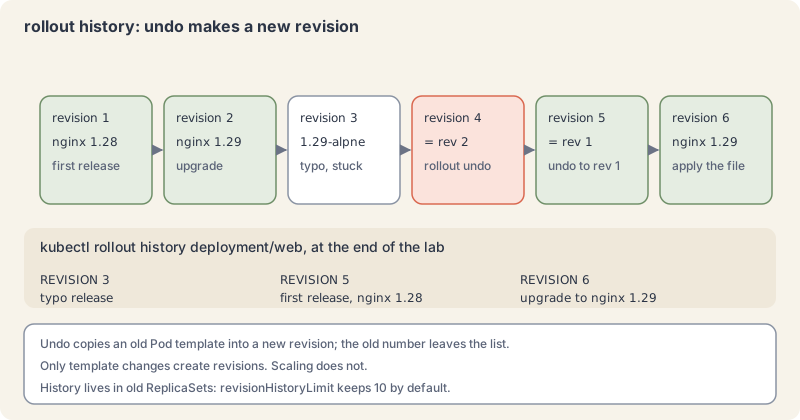
- Restart without changing anything. Sometimes you want fresh Pods with the same spec, for example after a ConfigMap change (part 9).
kubectl rollout restart deployment/web
kubectl rollout status deployment/web --timeout=60s
kubectl get rsExplain this command
kubectl rollout restart deployment/web
kubectl rollout status deployment/web --timeout=60s
kubectl get rskubectlThe Kubernetes command-line client. Subcommands and flags are documented under kubernetes.io/docs/reference/kubectl/.rolloutThe command group for rollout actions.restartRestart a resource by rolling its Pods.deployment/webThe resource written as type/name: deployment/web.kubectlThe Kubernetes command-line client. Subcommands and flags are documented under kubernetes.io/docs/reference/kubectl/.rolloutThe command group for rollout actions.statusShow the status of a rollout and wait until it finishes.deployment/webThe resource written as type/name: deployment/web.--timeout=60sHow long to wait before giving up. This command passes 60s.kubectlThe Kubernetes command-line client. Subcommands and flags are documented under kubernetes.io/docs/reference/kubectl/.getDisplay one or many resources. kubectl get prints a table of the most important information about the resources you name.rsThe resource type to display. kubectl get points you to kubectl api-resources for the full list of types the server supports.
deployment.apps/web restarted
deployment "web" successfully rolled out
NAME             DESIRED   CURRENT   READY   AGE
web-55dd75b68d   0         0         0       2m10s
web-575c6cb458   3         3         3       1s
web-76798cdcf8   0         0         0       59s
web-86f79b74d9   0         0         0       96s
restart adds a kubectl.kubernetes.io/restartedAt timestamp annotation to the Pod template. That counts as a template change, so you get a normal rolling update and a new ReplicaSet.
- Clean up. Deleting the Deployment removes its ReplicaSets and Pods through the owner references:
kubectl delete deployment web
kubectl get deployment,rs,podsExplain this command
kubectl delete deployment web
kubectl get deployment,rs,podskubectlThe Kubernetes command-line client. Subcommands and flags are documented under kubernetes.io/docs/reference/kubectl/.deleteDelete resources by file names, stdin, resources and names, or by resources and label selector.deploymentThe resource type.webThe object name.kubectlThe Kubernetes command-line client. Subcommands and flags are documented under kubernetes.io/docs/reference/kubectl/.getDisplay one or many resources. kubectl get prints a table of the most important information about the resources you name.deployment,rs,podsDeployments, ReplicaSets and Pods in one get. After the Deployment is deleted, the lesson shows no resources left.
deployment.apps "web" deleted from k8s-from-zero namespace
No resources found in k8s-from-zero namespace.
When it goes wrong
- The selector does not match the template. Symptom: apply fails with
The Deployment "web" is invalid: spec.template.metadata.labels: ... `selector` does not match template `labels`. The labels underspec.template.metadata.labelsmust include everything inspec.selector.matchLabels. - You need to change the selector. Symptom: apply fails with
spec.selector: Invalid value: ... field is immutable. The selector cannot change after creation. Delete and recreate the Deployment, or create a new one under a new name and move traffic. - A rollout never finishes. Symptom:
rollout statuswaits forever, or reportsexceeded its progress deadline. Runkubectl get podsandkubectl describe podon the newest Pod: image pull errors, crashes (part 4) and, later, failing readiness probes (part 10) are the usual causes. Fix the file and apply, orrollout undo. - Your scale keeps reverting. Symptom: you ran
kubectl scale, and the count went back after the next deploy. The file still says the old number. Changereplicasin the file. - Two controllers fight over Pods. Symptom: Pods appear and vanish with no change from you. Two Deployments (or a Deployment and a bare ReplicaSet) have overlapping selectors. Give each its own
app.kubernetes.io/instancelabel and select on it.
Cheat sheet
| Task | Command or field | Note |
|---|---|---|
| Draft a Deployment | kubectl create deployment web --image=nginx:1.29-alpine --dry-run=client -o yaml |
then edit and save |
| Wait for a rollout | kubectl rollout status deployment/web --timeout=90s |
exit 0 when complete |
| See the layers | kubectl get deploy,rs,pods |
names share the template hash |
| Scale | kubectl scale deployment web --replicas=5 |
the next apply of the file wins |
| Start a rollout | change .spec.template, then kubectl apply -f |
scaling starts none |
| Watch the swap | kubectl get rs --watch |
new up, old down |
| Surge and unavailability | strategy.rollingUpdate.maxSurge, maxUnavailable |
both default 25%, not both 0 |
| Stop old and new overlapping | strategy.type: Recreate |
expect a gap in service |
| Record why | metadata.annotations: kubernetes.io/change-cause |
shown in history |
| History | kubectl rollout history deployment/web |
--revision=N for details |
| Roll back one step | kubectl rollout undo deployment/web |
creates a new revision |
| Roll back to a revision | kubectl rollout undo deployment/web --to-revision=1 |
check it first |
| Fresh Pods, same spec | kubectl rollout restart deployment/web |
rolling, not all at once |
| Stall detection | spec.progressDeadlineSeconds |
default 600 |
| History kept | spec.revisionHistoryLimit |
default 10 old ReplicaSets |
| Delete with everything below | kubectl delete deployment web |
ReplicaSets and Pods go too |
apiVersion: apps/v1
kind: Deployment
metadata:
  name: web
  namespace: k8s-from-zero
spec:
  replicas: 3
  selector:
    matchLabels:
      app.kubernetes.io/name: web
  template:
    metadata:
      labels:
        app.kubernetes.io/name: web
    spec:
      containers:
        - name: web
          image: nginx:1.29-alpine
Recap and what is next
- A Deployment owns one ReplicaSet per Pod template version, and each ReplicaSet keeps its Pods at the requested count.
- Only changes to the Pod template start a rollout;
maxSurgeandmaxUnavailableset its pace. kubectl rollout statustells you when a rollout is done or stuck, and a stuck rollout leaves the old Pods serving.rollout undobrings back an old template as a new revision; then fix the file soapplyand the cluster agree.
Next: Kubernetes from Zero, part 8, Services, coming tomorrow.
Command explanations and quoted passages in this lesson come from or adapt the kubectl reference and the Kubernetes documentation, © The Kubernetes Authors, licensed under CC BY 4.0. We shortened and edited some passages. Kubernetes® is a registered trademark of The Linux Foundation. aitamer.news is not affiliated with or endorsed by The Linux Foundation or the CNCF.
The Campfire
CommentsThanks. Your comment is waiting for the desk. Once it is approved it appears here within about a minute.
Add a comment